Technical Questions
What versions are supported?
DustByte for macOS supports macOS 15 (Sequoia) and later versions.
DustByte for iOS supports iPhone and iPad running iOS 17 / iPadOS 17 and later.
Can I schedule automatic scans?
No, DustByte for macOS can't be configured to run automatic scans at regular intervals for now. We would be working on this feature in the future.
DustByte for iOS works in the background on its own: while your iPhone is charging, iOS lets it analyze your full photo library overnight, and rescans only look at new or changed items. iOS decides exactly when background work runs.
Does DustByte affect system performance?
DustByte is designed to run efficiently with minimal impact on system performance. It uses intelligent scanning to avoid interfering with your work. But we recommend closing all application before cleaning files.
Getting Started
First Launch
On the initial launch of DustByte, the application guides the user through a setup process that includes granting the required permissions to access the Applications folder. This access is essential for scanning installed applications and enabling DustByte’s app management functionality.
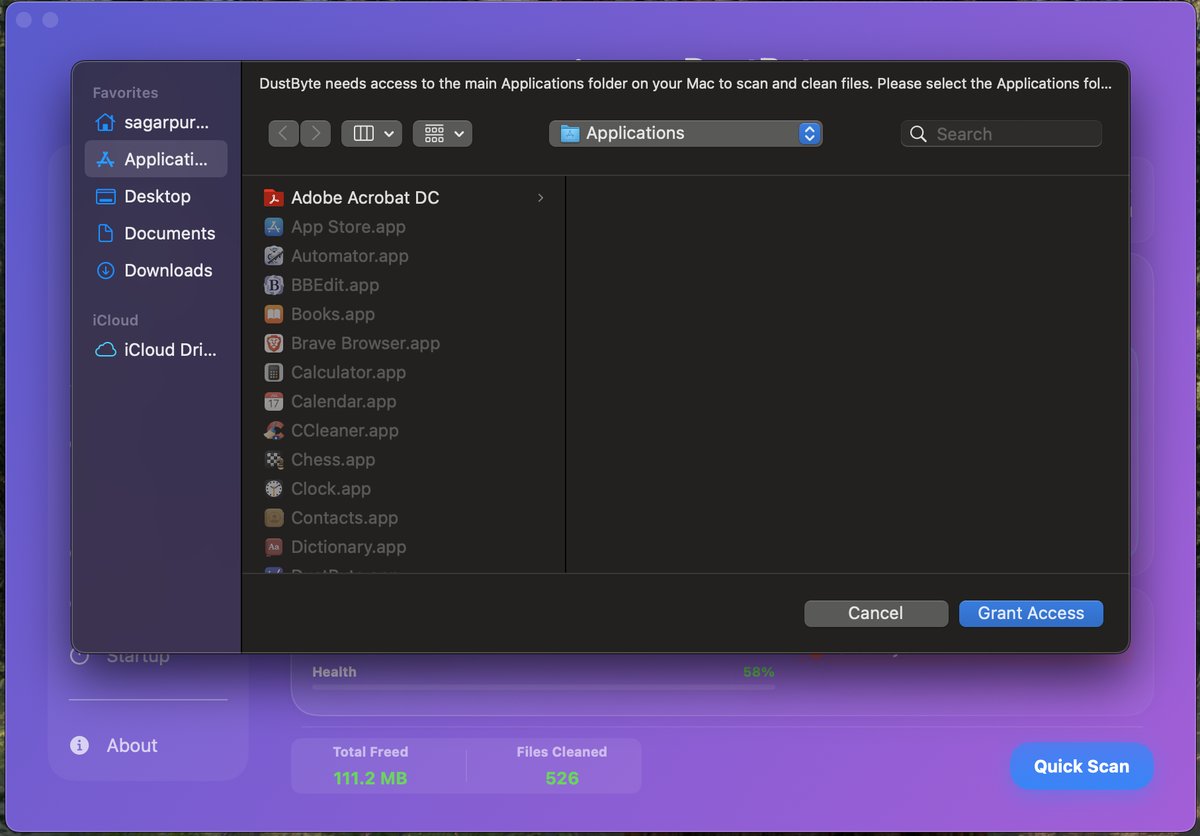
Granting Permissions
DustByte requires certain permissions to function properly. You'll be prompted to grant access to specific directories and system features as needed.
Running Your First Clean
Start with the System Cleaner to remove temporary files and cache data. The app will show you exactly what will be cleaned before proceeding.
Finding Large & Old Files
Open the Large & Old Files tool from the sidebar. Choose the folders you want to scan (e.g., Downloads, Documents, or external drives). After scanning, sort by size or last modified date to quickly spot space hogs and stale files. Review items and delete only what you no longer need.
Getting Started on iPhone & iPad
Free trial and Lifetime Access
DustByte is free to download. On first launch, start the free 7-day trial to unlock every feature: nothing is charged and nothing renews, and the trial can be used once per Apple Account. When it ends, features lock until you buy Lifetime Access, a one-time in-app purchase with no subscription.
Permissions
DustByte asks for access only when a feature needs it: Photos for photo, video and WhatsApp cleanup, Contacts for merging duplicates, a folder you pick in the Files app for duplicate files, and Notifications for alerts and weekly reports. Choose Allow Full Access for Photos so every photo and video can be scanned. You can change any of these later in the iOS Settings app under DustByte.
Running Your First Clean
Tap Review & Clean on the Clean tab. DustByte walks you through each list worth cleaning, then deletes everything you kept selected with a single confirmation. Deleted photos and videos go to Recently Deleted in Photos, where you can recover them for 30 days.
Floating monitor and Live Activity
Turn on Floating window in Settings > Widgets & Live Views to keep CPU and memory on screen while you use other apps. While it's on, a Live Activity shows the same readings on the Lock Screen and in the Dynamic Island.
Troubleshooting
App Won't Launch
If DustByte fails to launch, please begin by restarting your system and verifying that you have the latest version installed from the App Store. Should the issue persist, we recommend contacting DustByte Support and providing the crash logs to assist in diagnosing and resolving the problem.
Permission Issues
DustByte is designed to request the necessary user permissions during the initial setup and securely store them using security-scoped bookmarks for future operations.
If you encounter permission-related issues, navigate to About > Settings > Access to verify that DustByte has the required permissions.
DustByte remembers when you decline a folder, so scans don't keep asking. To be asked again, use Revoke All in Settings, then run the scan again.
"macOS protects this folder"
Some folders, such as the data folders of Firefox, Edge and Brave, or folders created by other sandboxed apps, are protected by macOS even after you've granted access to your Library. When DustByte needs one of them, it opens a window already inside that folder: just click Grant Access. You're only asked once, and DustByte never needs Full Disk Access.
Some items couldn't be removed
If an app you have open uses something you selected, DustByte asks before cleaning: choose Skip & Clean to leave those items for later, or quit the app and try again.
Leftovers created by apps that ran with administrator rights are owned by the system, and App Store apps aren't allowed to remove them. DustByte opens Finder with them selected, so you can drag them to the Trash and confirm with your password.
Purchases and Lifetime access
If DustByte doesn't recognise your purchase, click Restore on the upgrade screen (on iPhone and iPad, tap Restore on the purchase screen) while signed in to the same Apple Account you bought it with.
On Mac, buying Lifetime doesn't cancel an existing subscription automatically. Cancel it in the App Store under your account's Subscriptions, or with the Manage Subscription button DustByte shows after the purchase. The iPhone and iPad app has no subscription, so there's nothing to cancel.
iPhone: some photos or contacts are missing
If you gave DustByte access to only some of your photos, it can only scan those. Open the iOS Settings app, tap DustByte, then Photos, and choose Full Access. Do the same under Contacts if duplicate contacts are missing.
Slow Performance
If DustByte is running slowly, try closing other applications and ensure you have sufficient free disk space available.
Contact Support
Need More Help?
If you can't find the answer to your question in our FAQ or troubleshooting guides, please contact our support team:
Email Support
dustbyte.app@gmail.com
Response Time
We typically respond within 24-48 hours
Before Contacting Support:
- Check this FAQ for common solutions
- Ensure you're running the latest version
- Include your device, its macOS or iOS version, and your DustByte version
- Describe the issue in detail